
Midjourney AI – Online AI Image & Art Generator
Midjourney is a powerful AI tool that create simple text ideas into beautiful digital images. It helps users create unique and creative artwork quickly and easily. Artists, designers, and content creators use Midjourney AI to turn their ideas to life. Midjourney generates images from natural language descriptions, called prompts, similar to OpenAI’s DALL-E and Stability AI’s Stable Diffusion.
What is Midjourney AI?
Midjourney is one of the leading generative AI applications that transforms text prompts into highly detailed, creative, and visually striking digital art that helps users create stunning images without any design experience. People can talk to the bot using Discord’s chat app to make the images. Midjourney uses simple text prompts to create impressive images and was founded by David Holz.
Midjourney Latest Version
Midjourney V8.1 is the latest version. You will need to unlock your Global V7/V8 Personalization Profile to use it.
V8.1 has a consistent and familiar aesthetic in the spirit of V7, and includes Image Prompts, a new Prompt Shortener, and an updated Describe tool.
V8.1 has HD images, enable you to create higher resolution 2K images, without upscaling. Try it out using the --hd parameter.
Key Features of V8.1:
- Native HD Images: The
--hdparameter lets you generate 2K resolution images (approx 3x faster and cheaper than previous iterations). - Run as HD: A convenient web feature that allows you to rerun any Standard Definition (SD) job as HD with minor variations.
- Improved Tools: Upgrades to the Prompt Shortener and Describe tools, along with better image prompts.
How to use Midjourney? Beginner’s Guide
Midjourney is simple and easy to access, You can use Midjourney through Discord or Web App.
MidJourney web app, making the setup process even easier. Here’s a quick guide to help beginners get started.
How to Use Midjourney on Web?
Sign Up and Subscribe
1) Go to midjourney.com and click “Sign Up.”
Or Choose your sign-up method: Login with Google or Continue with Discord.
Subscribe: Pick any paid plan starting at $10 per month if you do not have an active subscription.
See more: Midjourney Pricing
Generating Your First Image
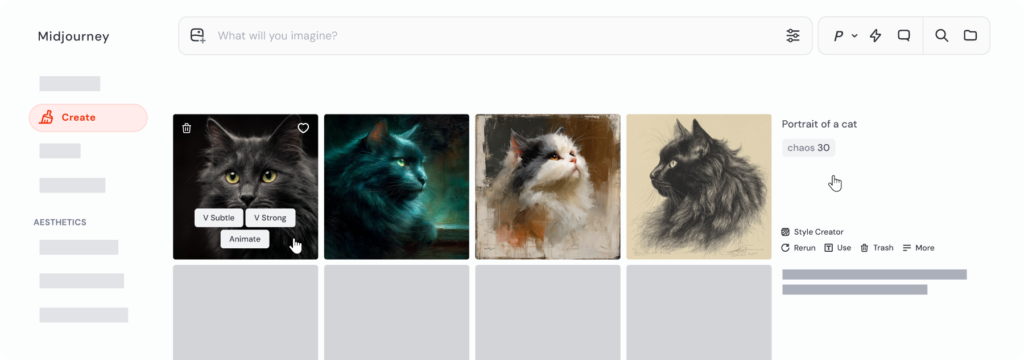
- Click the Create tab located in the left sidebar menu.
- Search the Imagine bar running along the top of the screen.
- Type a descriptive text phrase detailing the image you want to see.
- Press Enter to send your prompt to the AI generator.
- Wait a few seconds for a 4-image grid to generate in real-time.
See details here. https://docs.midjourney.com/hc/en-us/articles/33390732264589-Creating-on-Web
Create Images on Midjourney Web App
Here’s a Midjourney web app Guide for making AI art or First image.
- Visit Create page on midjourney.com. This is where your images come to life, and you can check them see in real-time.
- At the top of the page, you’ll see the Imagine bar. Here, type what you’d like to see—this is your prompt.

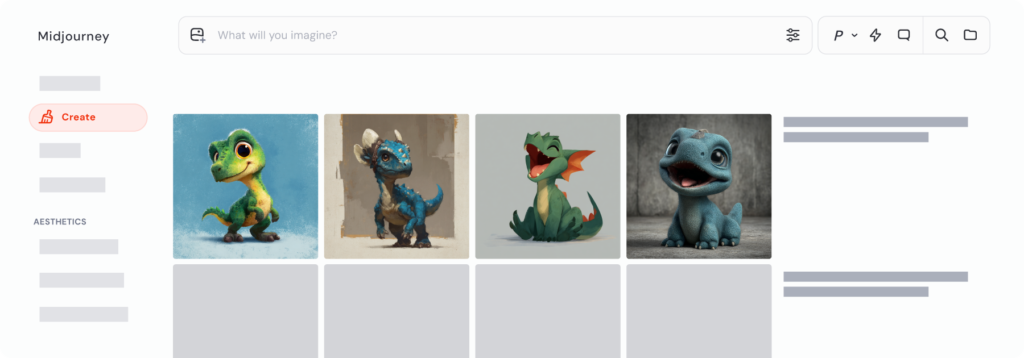
- After Clicking Enter or the send button if you’re using a mobile device, Midjourney generate a set of four images. Watch as your images take form.
- Congratulations! Once it reaches 100%, you’re done! You’ve created your first Midjourney images.
How to Use Midjourney on Discord
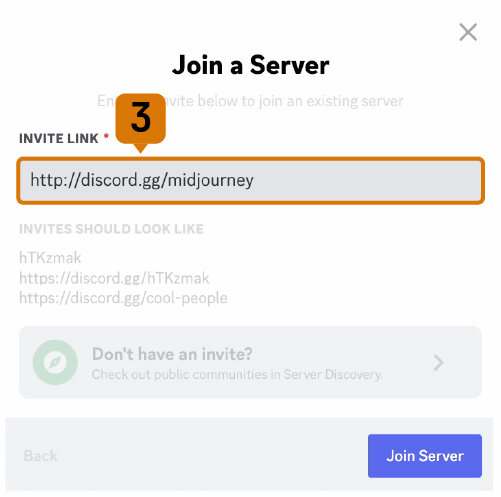
To start using Midjourney through Discord, join the Midjourney Server:
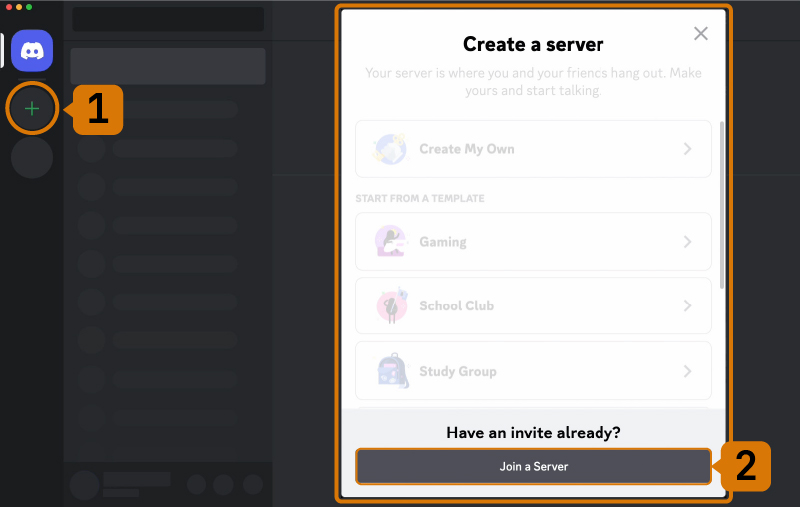
- Open Discord and locate the server list on the left-hand sidebar.
- Press the
+button at the bottom of the server list. - In the pop-up window, click the
Join a Serverbutton. - Paste or type the following URL: http://discord.gg/midjourney and press
Join.
Go to any #General or #Newbie Channel
After joining the Midjourney server on Discord, you’ll see several channels listed in the sidebar.
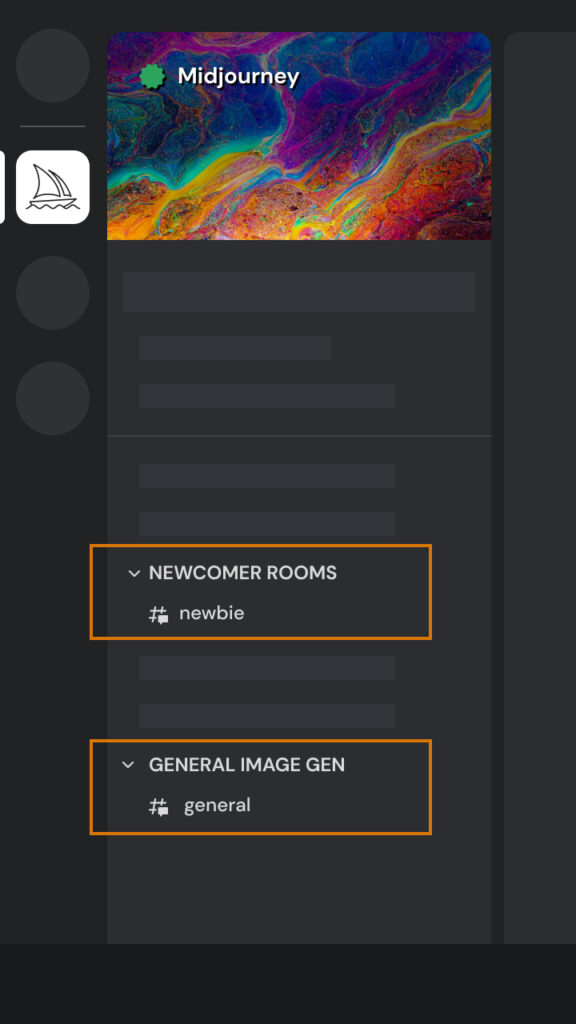
On the Midjourney Server
Locate and select any channel labeled general-# or newbie-1 through newbie-10. These channels are designed for beginners to start using the Midjourney Bot. The Midjourney Bot will not generate images in other channels.
Note: newbie channel numbers 11 and up have been archived and can no longer be used.
On Other Servers
You can generate images with the Midjourney Bot on any Discord server that has invited the Midjourney Bot. Look for instructions on your server on where to use the Bot.
Use the Imagine Command
Interact with the Midjourney Bot on Discord using commands. Commands are used to create images and videos, change default settings, monitor subscription information, and perform other helpful tasks. The /imagine command generates a unique image from a short text description, known as a prompt.
- Type
/in the message box. You’ll see a list of commands pop up above. - Keep typing until you see
/imagine. This helps narrow down the options, just like a search field. - Once you spot
/imaginein the list, click it. If you aren’t seeing any Midjourney commands. - Type your prompt into the prompt field.
- Press Enter or Send to execute the command.
Accept the Terms Of Service
Before generating any images, the Midjourney Bot will prompt you to accept the Terms Of Service. You must agree to these terms to proceed with image creation.
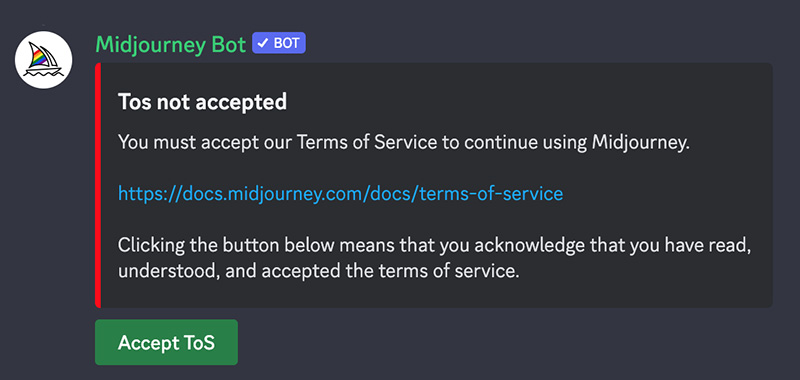
Image Generation Process
After sending a text prompt, the Midjourney Bot processes your request, generate four unique image options within a minute. This process utilizes advanced Graphics Processing Units (GPUs), and each image generation counts towards the GPU time included with your Midjourney subscription.
Select an Image or Create Variations
Once your initial image grid has been generated, two rows of buttons become available underneath your image grid.
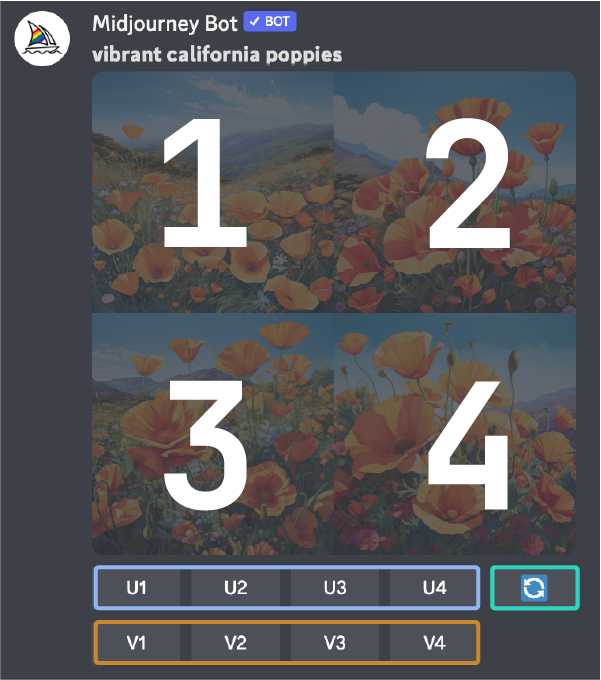
U1 U2 U3 U4 Image Selection
In earlier versions of Midjourney, the U buttons were used for upscaling images. With the latest version, images are immediately generated at 1024 x 1024 pixels size. Now, the U buttons help you separate out your chosen image from the image grid, making it easier to download and giving you access to additional editing and generation tools.
🔄 Reroll a Prompt
The 🔄 Reroll button reruns a prompt. In this case, it would rerun the original prompt producing a new grid of images.
V1 V2 V3 V4 Image Variation
The V buttons are used to create variations of the selected image. Each button generates a new image grid that maintains the general style and composition of the selected image.
Enhance or Modify Your Image
After singling out an image, an expanded set of options becomes available.
Save Your Creations
Click on the image to open it to full size, and then right-click and choose Save image. On mobile, long-tap the image and then tap the download icon in the top right corner.
All images are immediately available to view on midjourney.com
Midjourney FAQ’s
No. Anyone can generate images by simply describing what they need in a text prompt.
No, Midjourney is not completely free. It currently have paid subscription plans, and users need an active subscription to generate images.
For current pricing and plan details, visit Midjourney Official Website.
The latest official version of Midjourney is V8.1. Released in April 2026.
David Holz (founder of Leap Motion, now Ultraleap) is CEO of Midjourney.
Yes. r/midjourney: An official subreddit for Midjourney.
Yes, you can use Midjourney without Discord. You can generate images directly through the Midjourney Website.
We are not affiliated with Midjourney or any other links. All the links being provided as a convenience and for informational purposes only.